
Barracuda Cloud-to-Cloud Backup FAQS
Secure, easy-to-use SaaS backup for your Microsoft 365 data.
Frequently Asked Questions
What is Barracuda Cloud-to-Cloud Backup?
Barracuda Cloud-to-Cloud Backup is a software-as-a-service (SaaS) backup solution. As a SaaS solution, Barracuda manages the backup infrastructure, while you have full control over which region the data is stored, what data is getting backed up and control over the recovery of the data. Barracuda Cloud-to-Cloud Backup is accessed through Barracuda Cloud Control, a cloud-based service that makes it easy to configure and monitor Barracuda products and services from a single console.
How does Barracuda Cloud-to-Cloud Backup work?
Barracuda Cloud-to-Cloud Backup links with your Microsoft 365 account, performing regular backups of your data and securely maintaining multiple copies in a dedicated storage account at a location you select, ensuring you can retrieve the necessary data whenever required.
Is Barracuda Cloud-to-Cloud Backup secure?
Yes, Barracuda Cloud-to-Cloud Backup provides many capabilities to help secure your data, prevent attackers from gaining access to your backups and protect your backup data from ransomware. These capabilities include immutable backup copies, multi-factor authentication, role-based control, and end-to-end encryption.
The backup data also lives in an air-gapped location, isolated and decoupled from the Microsoft 365 infrastructure.
What data does Barracuda Cloud-to-Cloud Backup protect?
Use it to protect your Exchange Online, SharePoint Online, Teams, OneDrive and OneNote.
Barracuda Entra ID Backup is included at no additional charge with Barracuda Cloud-to-Cloud Backup. There are two versions of Barracuda Entra ID Backup. The version included with Barracuda Cloud-to-Cloud backup for M365 backs up your user, group, role, and administrative unit data. The premium version backs up your user, group, role, administrative unit, app registrations, audit logs, authentication method policies, authentication strength policies, BitLocker keys, conditional access policies, device management, enterprise applications, and named locations data.
Barracuda Entra ID Backup Premium is a standalone license only.
Can Barracuda Cloud-to-Cloud Backup for Entra ID be purchased standalone?
Yes. Barracuda Entra ID Backup is included in your Barracuda Cloud-to-Cloud Backup license, or it can be purchased as a standalone offering. Entra ID Backup Premium is available as a standalone license.
Microsoft 365 and Entra ID are protected by Barracuda Cloud-to-Cloud Backup and accessed through the same cloud-based interface.
Where is my Barracuda Cloud-to-Cloud Backup data stored?
Your Microsoft 365 and Entra ID backup data resides in the Microsoft Azure region of your choice. Barracuda have 13 regions around the world to choose from to meet your data residency needs.
How is Barracuda Cloud-to-Cloud Backup licensed?
Barracuda Cloud-to-Cloud Backup is licensed on a per-user basis. For Barracuda Entra ID Backup, all member users in the tenant must be licensed.
How much storage does Barracuda Cloud-to-Cloud Backup provide?
Barracuda Cloud-to-Cloud Backup includes unlimited storage. You are free to back up and protect an unlimited amount of data in Barracuda Cloud Storage.
Does Barracuda Cloud-to-Cloud Backup include Barracuda Entra ID Backup?
Yes, as long as Barracuda Cloud-to-Cloud Backup is actively licensed to backup Microsoft 365, Barracuda Entra ID Backup is included at no additional charge. Barracuda Entra ID Backup Premium is available as a standalone product.
How long can I retain my backup data?
Barracuda Cloud-to-Cloud Backup includes unlimited data retention. Unlimited retention means you can retain the data as long as you would like.
What happens when a user leaves the organization?
Barracuda Cloud-to-Cloud Backup will retain the users previously backed up Microsoft 365 and Entra ID data as long as you want, at no additional charge.
How can I retrieve backed-up data from users who left the organization?
You can restore a former user’s backed-up Microsoft 365 or Entra ID data to the original location, or to an alternate location for Microsoft 365 data. Even after the account is purged from Microsoft 365 or Entra ID, you retain access to important data.

Cloud-to-Cloud Backup is included in Barracuda Email Protection.
Discover the right plan for you.
Schedule your Cloud-to-Cloud Backup demo
Get a personalised product demo with a Barracuda cybersecurity expert.
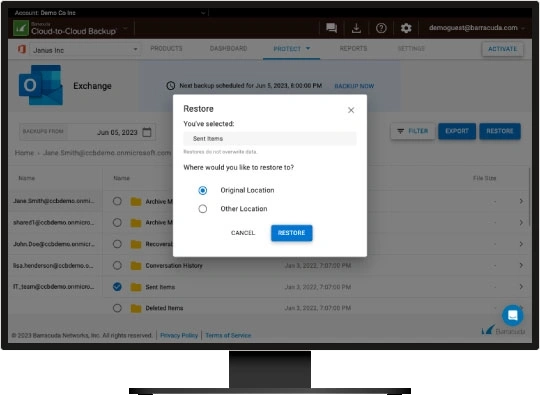
What is covered in the demo:
- Enable a full backup in minutes with no storage limits.
- Backup and restore of SharePoint documents and data.
- Implement multi-factor authentication to protect your data.
- Protect backups from ransomware attacks.