
Barracuda Microsoft 365 Protection
Protect Microsoft 365 Against Email Threats and Attacks
Barracuda Email Protection delivers advanced Microsoft 365 protection with AI‑enhanced detection, automated remediation and layered security controls.
Over 20,000 organisations trust Barracuda for Microsoft 365 security
Security
Block more advanced threats.
98%
of organisations that don’t use Barracuda have malicious messages in their Microsoft 365 inboxes.
Secure access.
500,000
Microsoft 365 accounts were compromised in 2021.
Response
Raise user awareness.
75%
reduction in phishing susceptibility after Security Awareness Training.
Automate response.
40%
of organisations say the lack of automation is the main obstacle to faster incident response.
Resiliency
Protect Microsoft 365 data.
70%
of IT decision makers don’t believe they need to back up Microsoft 365. Microsoft says you should.
Ensure business continuity.
79%
of organisations reported a Microsoft 365 email outage in the past 12 months.
Enhance Security
Cybercriminals test and design their attacks to evade the native security features of Microsoft 365. With phishing and account takeover among the fastest-growing email security threats, your Microsoft 365 accounts are at risk because native defences don’t provide the necessary level of protection.
Barracuda provides your Microsoft 365 email with more effective protection against phishing, business email compromise, and account takeover. With a powerful AI engine that uses the metadata of historical emails from internal and external senders combined with natural language processing, Barracuda’s Advanced Threat Protection, AI and Domain Fraud Protection enhance the security of Microsoft 365 with superior detection efficacy.
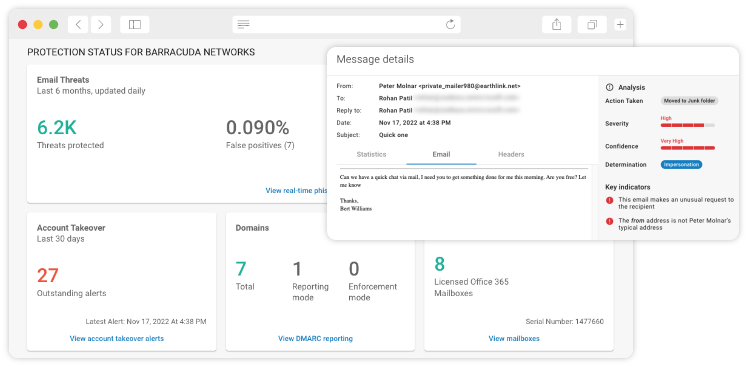
Protect Email
Enhance Microsoft native defence with Barracuda ATP and AI to detect zero-day, spear phishing, and business email compromise attacks missed by Microsoft.

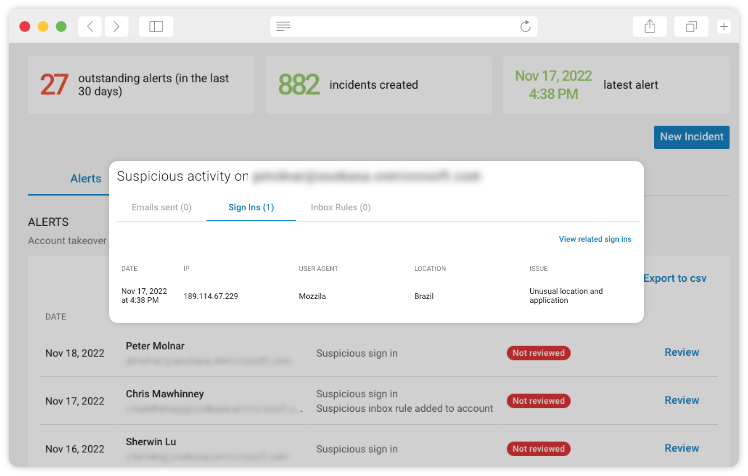
Protect Accounts
Detect and stop Microsoft 365 account takeover by identifying behavioural and content-forwarding anomalies within already compromised accounts.
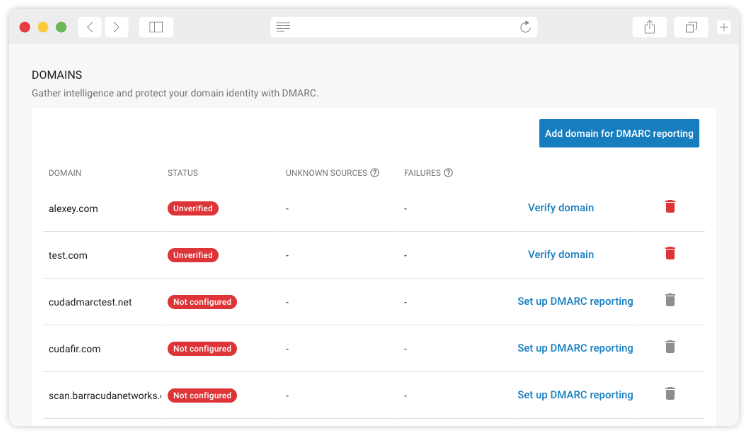
Protect Domains
Microsoft 365 security will not fully protect your brand from impersonation. Use Barracuda Domain Fraud Protection and DMARC reporting to protect your brand.
Improve Response
Even with the best email security technology, it’s possible for threats to reach vulnerable users. When they do, a lack of security awareness training and slow response leaves your organisation exposed to threats. Native Microsoft 365 security doesn’t provide sufficient tools to respond before the damage is done.
Barracuda automates incident response and provides access to threat insights for faster and more efficient remediation. Our solution identifies users in need of training and improves workflow for more seamless incident response. Barracuda offers a powerful phishing simulation and training platform that lets you automatically train users and test security vulnerabilities with simulated phishing attacks.
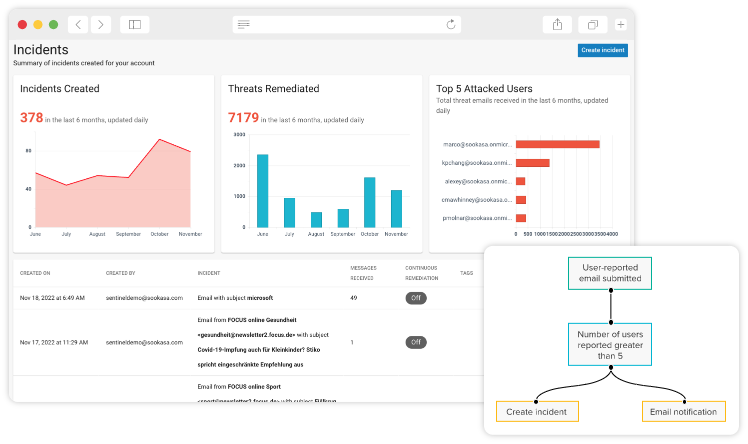
Respond to Threats Faster
Your native Microsoft 365 security does not offer sufficient response tools for post-delivery remediation. With Barracuda Incident Response, your security team can identify, investigate, and automate response to threats inside your users’ inboxes.
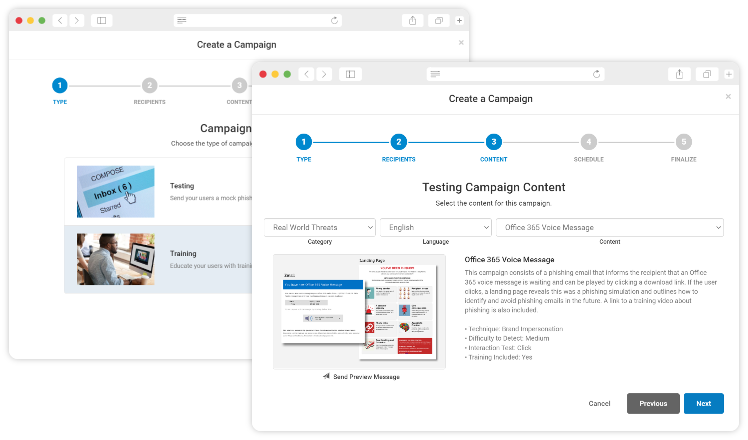
Train Users
Improve users’ security awareness using examples of real-life threats that target your organisation.
Ensure Resiliency
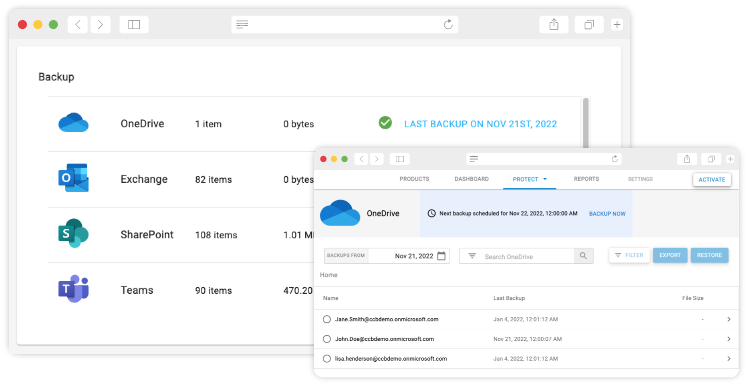
Microsoft 365 native retention is complex. Microsoft recommends using third-party backup for all your Microsoft 365 data. Barracuda offers comprehensive cloud backup, as well as granular and full recovery for Teams, Exchange Online, SharePoint, OneDrive for Business, Planner, and Entra ID. You can quickly and easily restore files and emails to wherever you need them. In the event of a mail service outage or a loss of connectivity, Barracuda’s email continuity allows your organisation to stay connected and productive during downtime.
Protect Data
Microsoft recommends customers use third-party solutions to back up Microsoft 365 data. Barracuda can help.
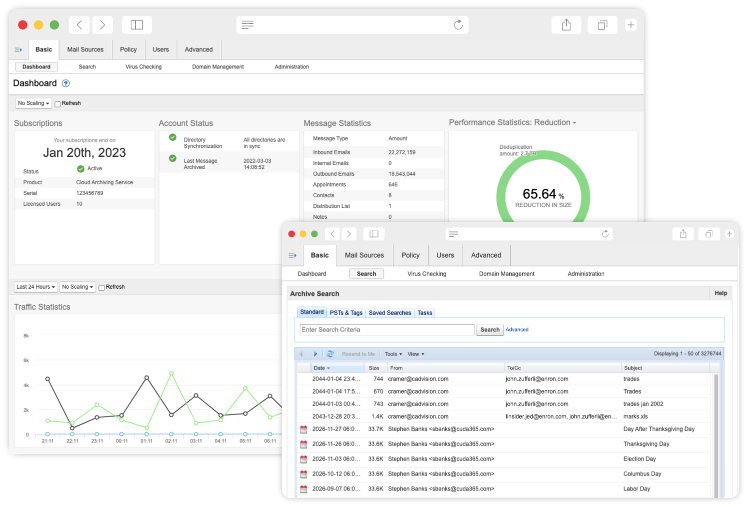
Ensure Compliance
Meet demanding compliance requirements and address e-discovery requests with tamper-proof archiving and granular retention policies.
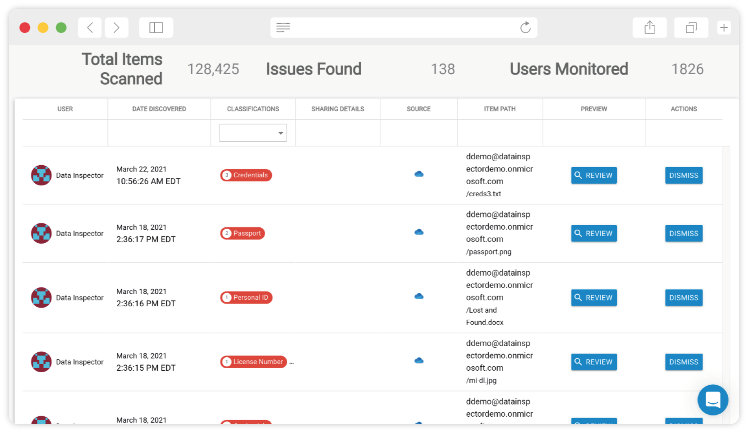
Find Dormant Threats
Secure your Microsoft environment against improperly stored sensitive data and latent malware with Barracuda Data Inspector.
Microsoft 365 + Barracuda
Strength in Security
| Features | Barracuda | Microsoft EOP* | Microsoft Defender Plan 1 | Microsoft Defender Plan 2 |
|---|---|---|---|---|
| Spam and Malware Protection | ✓ | ✓ | ✓ | ✓ |
| Email Encryption | ✓ | ✓ | ✓ | ✓ |
| Data Loss Prevention | ✓ | ✓ | ✓ | ✓ |
| Zero-day Attachment Protection | ✓ | ✓ | ✓ | |
| Zero-day Link Protection | ✓ | ✓ | ✓ | |
| Phishing and Impersonation Protection | ✓ | ✓ | ✓ | |
| Automatic Remediation | ✓ | ✓ | ✓ | |
| Unlimited Cloud Archiving | ✓ | ✓ | ✓ | |
| Security Awareness Training | ✓ | ✓ | ||
| Threat Hunting and Response | ✓ | ✓ | ||
| SIEM/SOAR/XDR Integrations | ✓ | ✓ | ||
| Attack Simulation | ✓ | ✓ | ||
| Account Takeover Protection | ✓ | |||
| Email Continuity | ✓ | |||
| Automated Workflows | ✓ | |||
| Domain Fraud Protection | ✓ | |||
| Cloud-to-Cloud Backup | ✓ | |||
| Data Classification | ✓ |
*Microsoft Exchange Online Protection
Microsoft Defender Plan 1 and 2 are included with E5 or available at an additional cost for all other Microsoft 365 plans.
Is Microsoft’s email security good enough?
The top 7 gaps in Microsoft 365 email security
Schedule your Email Protection demo
Get a personalised product demo with a Barracuda cybersecurity expert.

What is covered in the demo:
- Scan for latent threats in your inbox.
- Identify and understand your current email cyber risks.
- How to set up Barracuda Email Protection in minutes.
- How to protect your data and ensure compliance.
- How Barracuda automates threat detection and response.